There is a moment in setting up online booking that almost nobody writes about: a practice with more people wanting in than hours available is afraid to turn it on. And rightly so.
It is easy to think "surely any booked hour is a good hour." That is not true in practice, where a patient comes in as part of a series. An hour taken by someone from the internet is an hour that is not there for a patient partway through treatment - and it is that patient who determines the outcome, and whether they come back in six months.
How it gets worked around today
Before getting to how to solve this, it is worth naming what people do today.
Publishing only one day. Online booking works on Thursdays and nowhere else in the week. A patient who hits an empty page once will not check a second time.
Turning booking off entirely. The simplest option, but a costly one, because it brings back phone calls answered between visits.
What actually solves this
The problem is not that online booking is bad. The problem is that most schedulers know only one question - when do you work - and turn the answer into the booking page: either the patient sees your working hours, or they do not.
The right fix separates two questions. When you work is one. Who may book into those hours is the other, and it has three answers:
| New patients online | What somebody new sees |
|---|---|
| Not at all | A waiting-list sign-up |
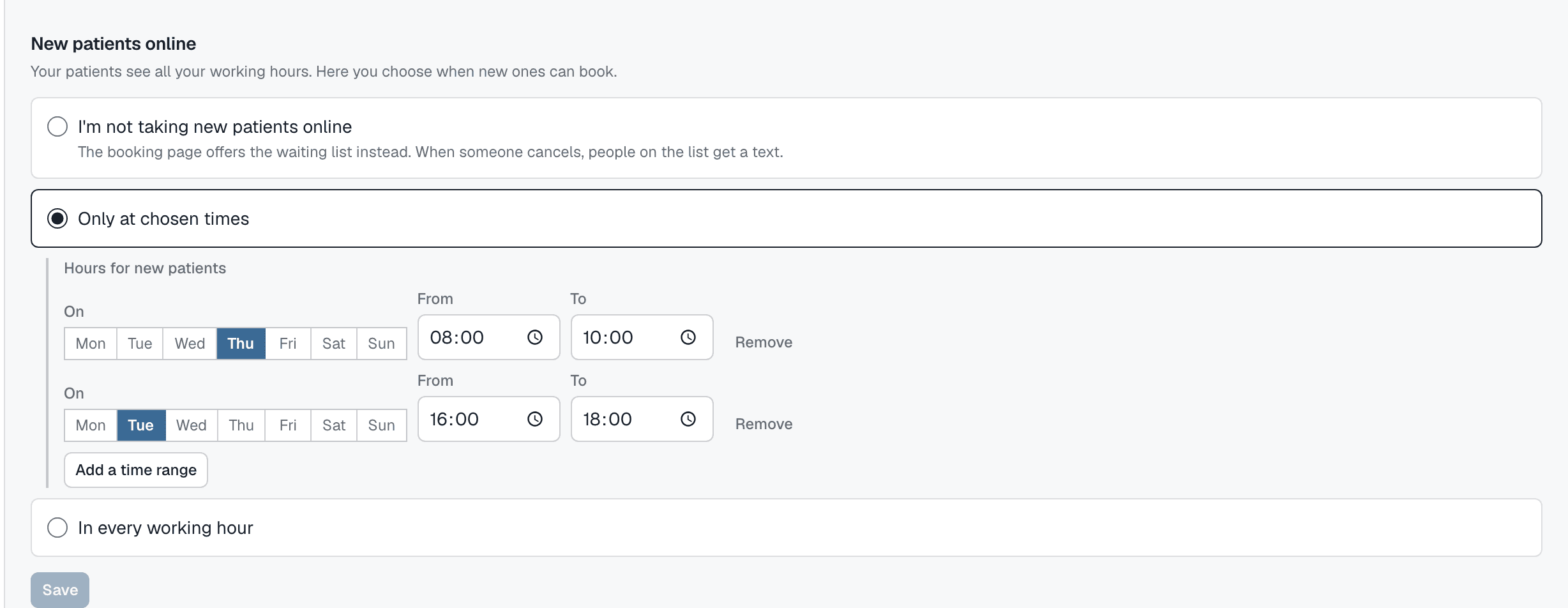
| Only in chosen hours, say Tuesday 16:00 - 18:00 | Those windows and nothing else |
| In every working hour | Every free hour |
Your own patients are not "somebody new": they reschedule their visits into any free working hour, and the waiting list gets the whole schedule. The restriction applies only to somebody you do not know yet.
Two things worth checking
If you are looking for a scheduler that does this, there are two questions worth asking - because "hour blocking" on a pricing page can mean two different things.
Can you, and your own patients, still fill an hour that is closed to new patients? There is a difference between "this hour is closed to everyone" and "nobody from the internet can book this hour." The first is a break. The second is a new-patient setting, and only that one solves this problem.
Can the waiting list still get it? Somebody on the list is not a stranger - you put them there, or you accepted their request. A scheduler that treats them as one and skips the hours closed to new patients hands a canceled hour to nobody. Closed to new patients cannot mean closed to the list.
Setting this up for yourself
Counterintuitively, the hard part is not the clicking - it is the decision. Start with one sheet of paper and one question: which hours in the week genuinely have to stay mine?
The answer is usually smaller than it seems - two mornings and one afternoon. The rest can be published without risk, and if it turns out to be too much, changing it takes a few seconds and does not touch the other days.
What this looks like in Appointomat
It is one setting per practitioner, on the "Working hours" screen, below the week: New patients online - not at all, only at chosen times, or in every working hour. With the second option you add time ranges, say Tuesday 16:00 - 18:00, and the week is colored wherever somebody new can book. Your own patients and the waiting list always get the whole schedule.