
When you work and who may book are two separate questions
Working hours say only when you see patients. Separately, for each practitioner, you set whether somebody new may book online - and in which hours. That is what makes publishing a booking page possible without giving away the whole week.
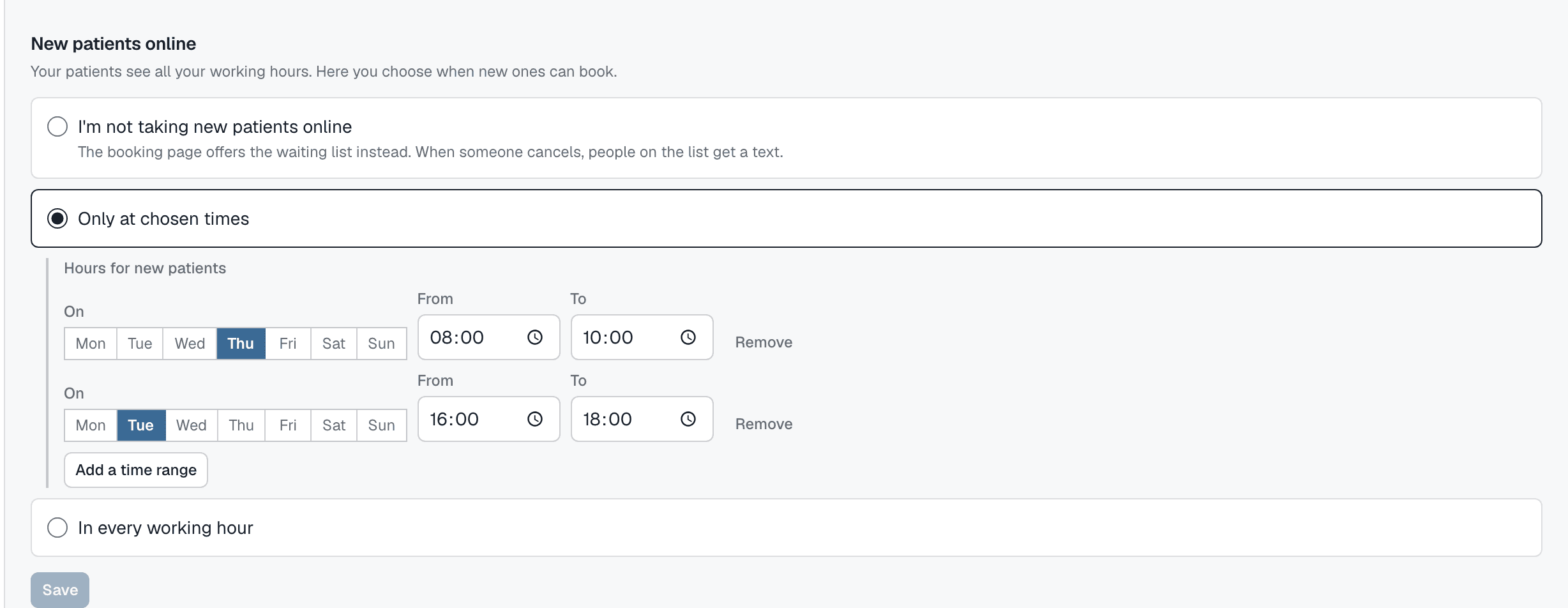
Three settings, one sentence each
You pick one of three. Changing it takes a moment and leaves your working hours alone.
No new patients online
The booking page shows no free hours to anybody new. Instead it offers the waiting list, and when somebody cancels, people on the list get a message. This is how a practice with a full schedule works.
Only in chosen hours
Tuesday 16:00 to 18:00 and Thursday 8:00 to 10:00, say. A new patient sees only those windows, and only when you actually work - a window on a day off publishes nothing.
In every working hour
Every free hour is on the booking page. This is the default for a new practice, so the page has something to show from day one.
Your own patients get the whole schedule
A patient who already sees you reschedules their visit, through the link in the reminder, into any free working hour - not only the ones open to new people. The waiting list and gap-closing use the whole schedule too. The restriction applies only to somebody you do not know yet.
Restricting the booking page is about a patient midway through a course, who has to be fitted in, taking priority over somebody from the internet - while a canceled hour does not stay empty just because the waiting list could not offer it.
Questions
Can a new patient tell I am hiding something?
No. They see only the hours open to them - outside those, neither free nor taken. From their side, that is simply what your schedule looks like.
Can I set it differently for each practitioner?
Yes. The setting belongs to the person, not to the practice. One can take new patients in every working hour, another only on Thursdays, a third not at all.
What about a visit already booked in an hour I am closing to new patients?
It stays. The setting governs who can book from now on, not what is already in the calendar - nobody's appointment gets canceled because a setting changed.
Can I still book somebody by hand into an hour closed to new patients?
Yes, whoever you like, from the console or over the phone. Closed to new patients means "not from the internet, unintroduced", not "blocked".
Start with your own week
Create an account, enter your working hours, and decide when new patients may book. The first 30 days are free, with no card.