
You enter the week once
Working hours usually repeat across several days, so you enter them for several days at once. The exceptions - a closure, a shorter Friday, a break that came up - go in separately and leave the rule underneath alone.
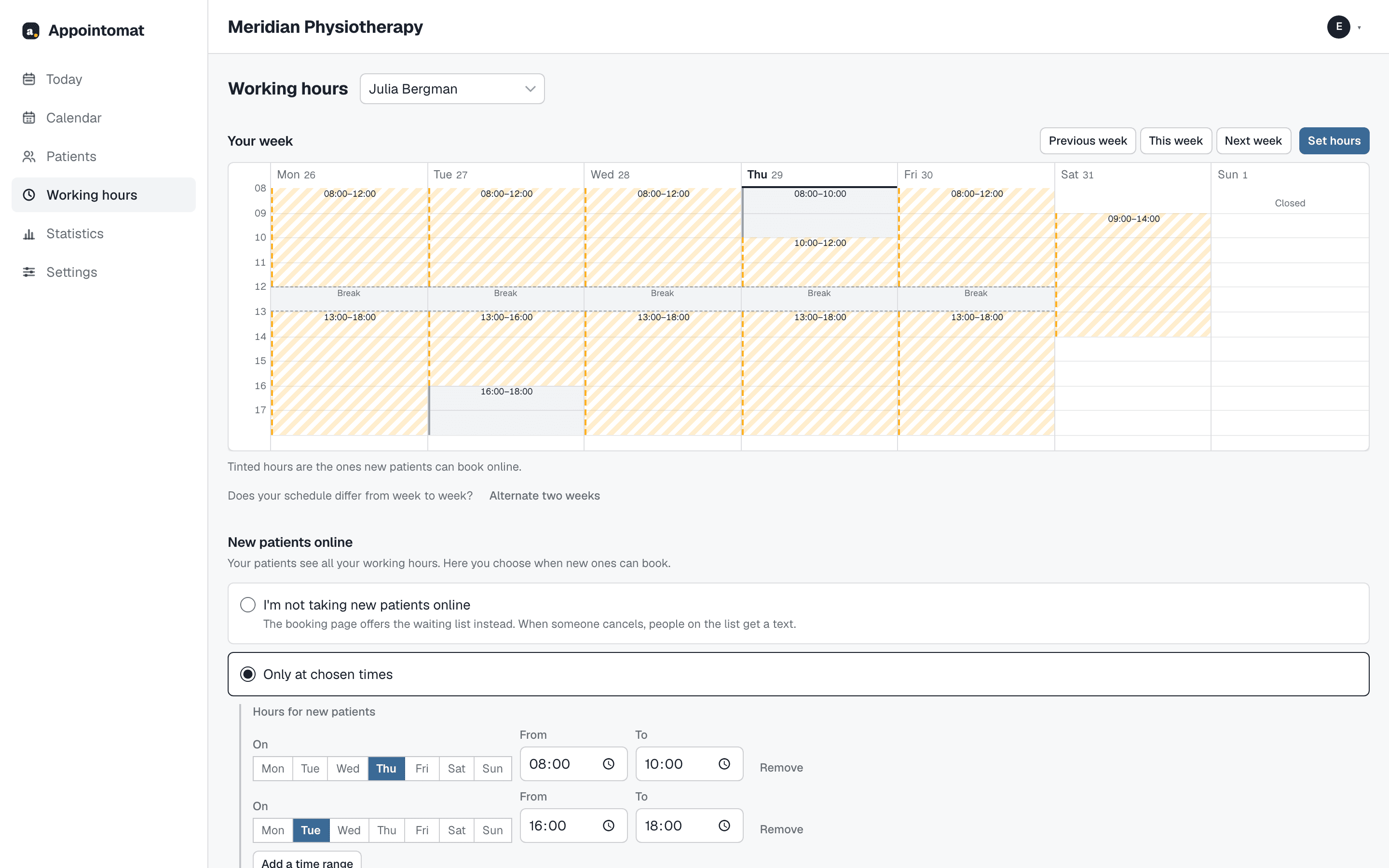
What a week is made of
Only working hours are required. Breaks, time off and a buffer are there when you need them.
A day entered the way you would say it
"8 to 12, then 13 to 16", for several weekdays at once. The week strip draws the result proportionally, so a shorter Friday looks shorter. If you alternate weeks - Monday, Wednesday, Friday one week, Tuesday and Thursday the next - you enter two weeks and the schedule repeats.
A break is the gap between two stretches
You add it and take it away in the same window where you enter the day's hours - no separate screen, and no guessing which rule made it. A break applies to everybody: it reaches neither the booking page nor the waiting list.
Time off takes a date range
Time off goes in once, as "from - to". Those days are closed in the calendar and the booking page does not show them.
A buffer after a visit
Time for notes and for resetting the room, added to the service. A visit takes its own length plus the buffer in the calendar - which is why a service sometimes will not fit into hours that look long enough, and why the free-slot list says so plainly when it comes back empty.
The other calendar, the one outside this system
Nearly every practice has a second calendar - a personal one on the phone, or the one inside the records system. If the scheduler cannot see it, sooner or later it will book a patient into an hour that is already taken, and then you are keeping a paper calendar to protect the digital one.
Appointomat reads busy time from an external calendar over an ICS address and stores only the interval from it - not the title, not the attendees, not the description. That is enough to stop you being double-booked, and too little for anybody here to know where you were on Tuesday.
Questions
Can I move a visit by dragging it in the calendar?
Yes, on a desktop. A visit dragged somewhere else lands on the nearest real free slot for that practitioner on that day rather than on whatever pixel you dropped it at - and it can be dragged exactly when it can be rescheduled with the button, so that one does not do things the other forbids.
What about a patient already booked into an hour I am closing?
They stay booked. Changing working hours governs what can be booked, not what is already in the calendar - if you want to move somebody, you do that deliberately and separately.
Can a time zone break something for me?
Hours are always your practice's hours. You enter 9:00 and everybody - you, the patient, the reminder - sees 9:00, wherever they are and however their phone is set.
Start with your own week
Create an account, enter your working hours, and decide when new patients may book. The first 30 days are free, with no card.