The appointment reminder is the message a practice sends most often, and the only one every patient gets. It usually goes out the day before and reads like a machine wrote it. Both can be changed, and the first is the one to start with.
One day or two days ahead
A reminder the day before has one flaw: the patient remembers they cannot make it in the evening - and tomorrow morning's hour stays empty, because nobody can fill it any more.
Two days ahead changes what happens after the cancellation. There is a whole day left to offer the freed hour to somebody on the waiting list, and for that person to answer. A separate post covers how that queue should work; here one thing is enough: without time, there is nobody to ask.
Three days make sense for rare visits - a quarterly check-up the patient may genuinely have forgotten. For visits in a weekly series, three days is too early: the message arrives before the patient has started thinking about that week.
The rule is simple: as far ahead as you need to fill a canceled hour. For most practices that is two days.
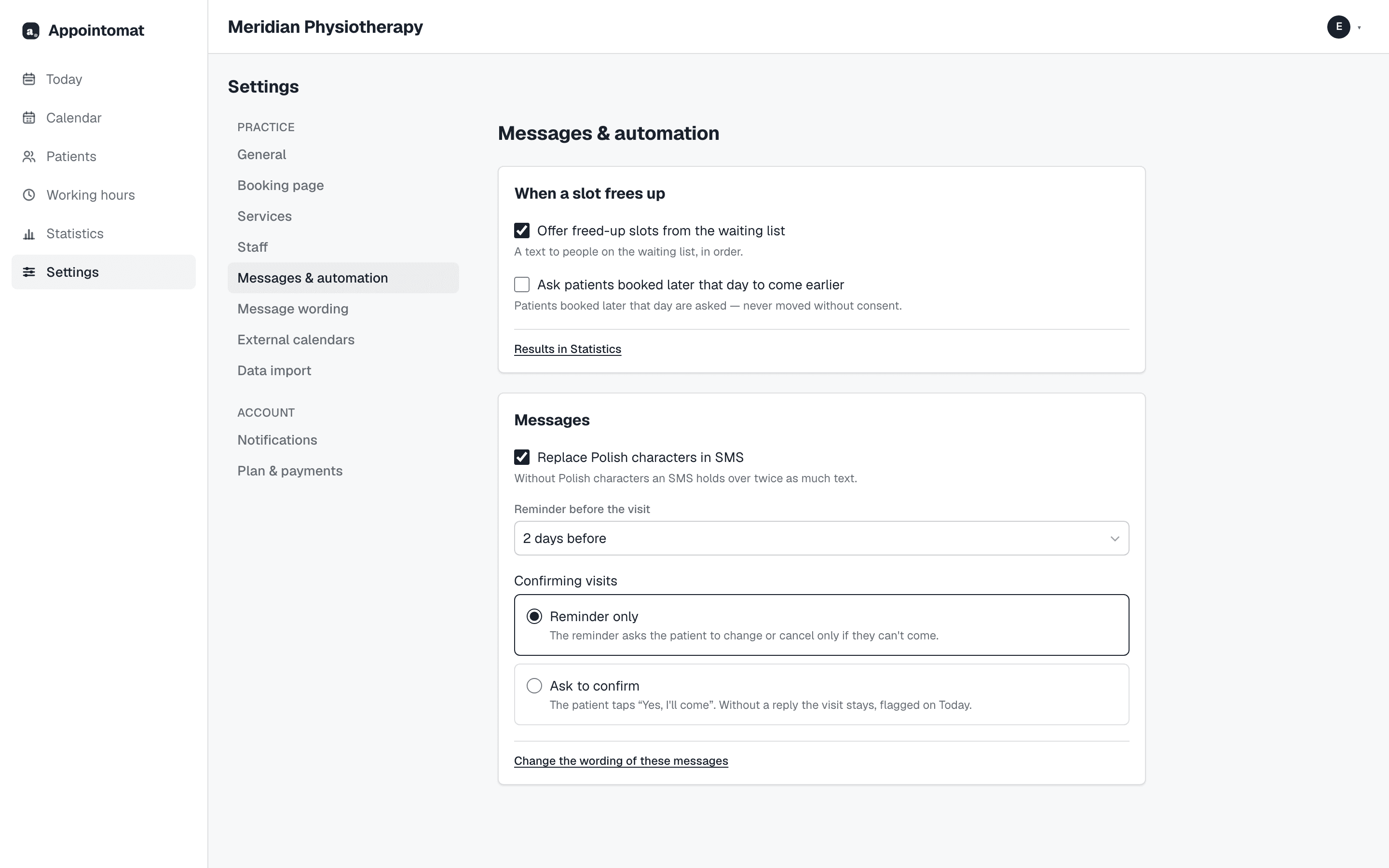
In Appointomat it is one field: "Settings → Messages & automation → Reminder before the visit" - 1, 2 or 3 days before. Changing it also moves reminders that have not gone out yet, so there is no need to wait for a new week.
What belongs in a reminder
Four things, in this order, and nothing else.
Who is writing. The SMS arrives from a generic sender, not from your number, so the practice name has to be in the text - best at the start, because that is what the patient sees on the lock screen.
What and when. The day, the time, the kind of visit.
What to do. One link where the patient can confirm, reschedule or cancel. Without a link a reminder is an announcement: a patient who cannot come has nothing to do with it, and usually does nothing.
What to leave out. Anything about health. An SMS shows on the lock screen, sometimes in somebody else's hands. "Scar therapy" or the name of a condition has no business there - the visit's name in a message is "visit" or something equally plain, even if the calendar calls it something else.
There is one more limit that surprises people: one SMS is 160 characters, but only 70 if it contains Polish characters. One "ś" in the practice name and the message counts double. So write short, or let the scheduler swap Polish characters for plain ones.
What it reads like, and how to change it
The default reminder in Appointomat is deliberately short, for example:
Meridian Practice: visit Tuesday, October 14, 16:00. Confirm or change: appointomat.com/a/…
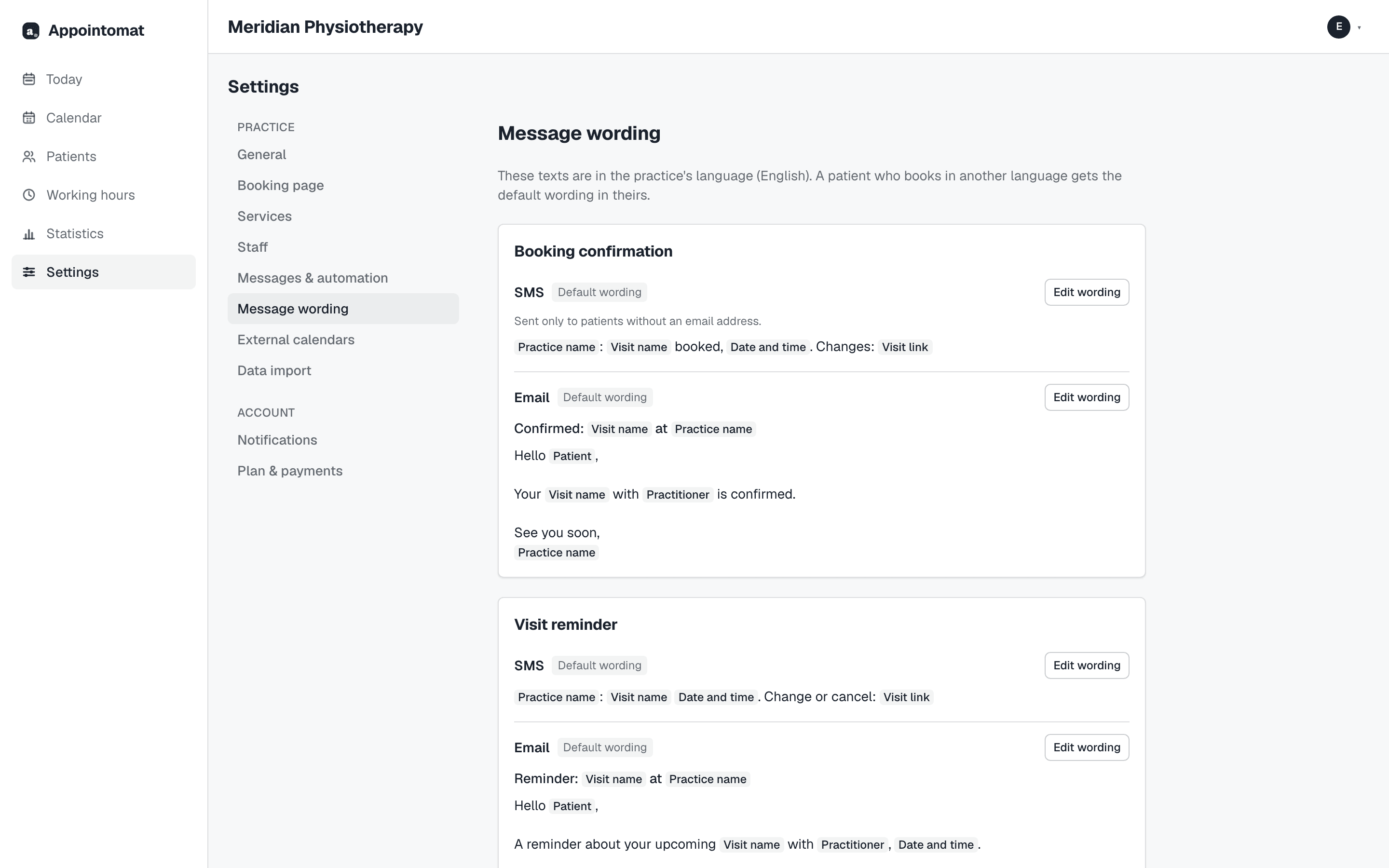
If you want it to sound like you, change it under "Settings → Message wording". There are four texts there - the booking confirmation and the reminder, each as an SMS and as an email - and "Change wording" next to each. Instead of typing a patient's details you insert fields with buttons: practice name, visit name, date, practitioner, patient, visit link. One rule: an SMS must contain the link, because without it the patient cannot confirm or change the visit.
Below it is a preview with a sample patient and your real practice name - and a counter of how many SMS this wording takes. That is the place to check whether your own phrasing still fits in one.
An example that sounds like a person and fits in one message:
This is {practice name}. A reminder: {visit name} {date}. Can't make it? Change the time here: {link}
The email has more room, but the button to the visit, the date and the calendar file are always added - the text you write is only what the patient reads above them.
What the patient gets after tapping
A page for that one visit, no sign-in: "Confirm", "Change the time", "Cancel". Changing the time shows free hours to pick from. Canceling frees the hour at once - and that hour is what can go to somebody on the waiting list, if the reminder went out early enough.
In the calendar you see on every visit whether it is confirmed, and on the "Today" screen how many of today's visits are still waiting for one.
What it costs
SMS reminders come with the paid plans, and a plan counts visits, not messages: Solo reminds by SMS before 200 visits a month, Team before 400, Clinic before 800. Past the limit reminders keep going by SMS for a while, then by email - nothing is blocked and nothing is added to the bill. On the Free plan reminders go by email from the start.
The booking confirmation goes by email, and by SMS only to a patient without an email address; the reminder goes by SMS, one per visit. It is still worth fitting your wording into one SMS: a longer one is two per visit, and the headroom past the limit runs out faster with it - that is the counter under the preview.